mayaBump2D has an RGB parameter for normal maps, and it’s named “normal_map”:
C:\solidangle\mtoadeploy\2015\bin>kick -l ..\shaders -info mayaBump2D
node:         mayaBump2D
type:         shader
output:       RGBA
parameters:   11
filename:     ..\shaders/mtoa_shaders.dll
version:      4.2.4.1

Type          Name                              Default
------------  --------------------------------  --------------------------------

FLOAT         bump_map                          0
FLOAT         bump_height                       1
RGB           normal_map                        0, 0, 1
BOOL          flip_r                            true
BOOL          flip_g                            true
BOOL          swap_tangents                     false
BOOL          use_derivatives                   true
BOOL          gamma_correct                     true
ENUM          use_as                            bump
RGBA          shader                            0, 0, 0, 1
STRING        name
In Maya, you don’t connect your normal map directly to mayaBump2D.normal_map. Instead, just connect the normal map alpha to the Bump Value

and then change bump2d > 2d Bump Attributes > Use As to Object Space Normals or Tangent Space Normals.
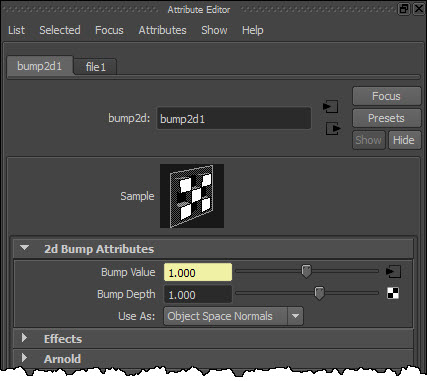
The Use As parameter controls how MtoA translates the shaders to Arnold. For example, if Use As is Object Space Normals, you get this:
mayaBump2D
{
 name bump2d1
 bump_map file1.a
 bump_height 1
 normal_map file1
 flip_r on
 flip_g on
 swap_tangents off
 use_derivatives on
 gamma_correct on
 use_as "object_normal"
 shader aiStandard1
}

MayaFile
{
 name file1
 ...
 filename "shaders_offest_normalmap.jpg"
 ...
Notice that file1 (the MayaFile node) is linked to mayaBump2D.normal_map.
 Arnold Support Corner