kick -tree prints the shading network for a shader node. For example, given this:
polymesh
{
 ...
 shader "Sources.Materials.DefaultLib.Material.standard.SItoA.41000.1"
 ...
}

standard
{
 name Sources.Materials.DefaultLib.Material.standard.SItoA.41000.1

}
You can print out the shader tree for the standard shader like this:
set ASS_FILE=//Projects/Support/Arnold_Scenes/example.ass
set NODE=Sources.Materials.DefaultLib.Material.standard.SItoA.41000.1
set SHADER_PATH=%SITOA_BIN%
%KICK_PATH%\kick.exe -tree %NODE%  -i %ASS_FILE% -l %SHADER_PATH%
For a [simple] shading tree that looks like this:
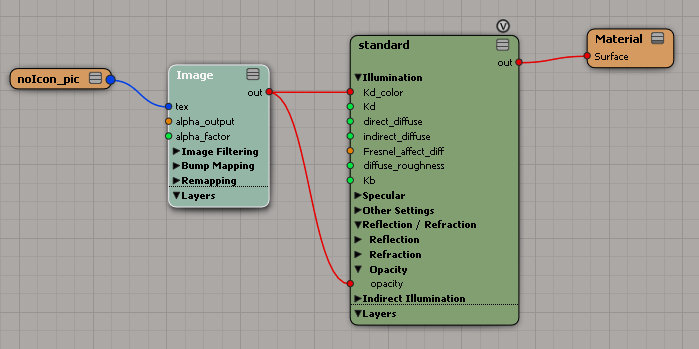
You would get this:
standard:Sources.Materials.DefaultLib.Material.standard.SItoA.41000.1
  |
  +-Kd_color = txt2d_image_explicit:Sources.Materials.DefaultLib.Material.Image.SItoA.41000.2
  |   |
  |   +-tex = sib_image_clip:Sources.Materials.DefaultLib.Material.noIcon_pic.SItoA.41000.3
  |
  +-opacity = txt2d_image_explicit:Sources.Materials.DefaultLib.Material.Image.SItoA.41000.2
      |
      +-tex = sib_image_clip:Sources.Materials.DefaultLib.Material.noIcon_pic.SItoA.41000.3

max depth:       2
total shaders:   5
cycles detected: 0

shader counts:
  2 txt2d_image_explicit
  2 sib_image_clip
  1 standard

one-to-many connections:
  2 txt2d_image_explicit:Sources.Materials.DefaultLib.Material.Image.SItoA.41000.2
  2 sib_image_clip:Sources.Materials.DefaultLib.Material.noIcon_pic.SItoA.41000.3
Notice that txt2d_image_explicit and sib_image_clip are counted twice, because those branches are plugged into two different ports on the standard shader.

 Arnold Support Corner