[MtoA] One mtoa.mod to rule them all


After a few tries, I got one mtoa.mod file that works for multiple Maya versions:

+ MAYAVERSION:2015 mtoa any C:\solidangle\mtoadeploy\2015
PATH +:= bin
+ MAYAVERSION:2014 mtoa any C:\solidangle\mtoadeploy\2014
PATH +:= bin
+ MAYAVERSION:2013 mtoa any C:\solidangle\mtoadeploy\2013
PATH +:= bin

I had to repeat the PATH line for each module, otherwise the bin folder wasn’t added to the PATH.

I just had to set MAYA_MODULE_PATH to point to this mtoa.mod file, and then I could load MtoA in Maya 2013, 2014, and 2015.

This could be useful if you have multiple users sharing a single machine, because with this mtoa.mod, you don’t have to worry about putting version-specific mtoa.mod files in every user’s Maya folder (by default, the MtoA installer puts mtoa.mod in the user’s $MAYA_APP_DIR\\modules\\<version> folders).

Another way to do it would to be put the mtoa.mod files in the default shared modules folders. For example, on Windows:

C:\Program Files\Common Files\Autodesk Shared\Modules\Maya\2013
C:\Program Files\Common Files\Autodesk Shared\Modules\Maya\2014
C:\Program Files\Common Files\Autodesk Shared\Modules\Maya\2015

On Linux:

/usr/autodesk/modules/maya/<version>

On Mac OS X:

/Users/Shared/Autodesk/maya/<version> for MacOS
[MtoA] Installing the BA shaders in Maya


You can use the BA shaders in Maya with MtoA. The BA shaders are Arnold shaders, so you can use them anywhere that you use Arnold.

Here’s how:

  • Download the Maya mental ray package of the BA shaders. For example, for Maya 2014, the most recent version is
    >>>v25.01.09 Maya 2014 mentalRay
  • Extract the archive. For example, you could extract the archive to a C:\solidangle\BA folder.
  • Set MAYA_SCRIPT_PATH to point to the scripts\AEtemplates folder. For example:
    set MAYA_SCRIPT_PATH=C:\solidangle\BA\140219__baEssential_25.01.09___Maya_2014_MRay\scripts\AETemplates
  • Download the Arnold shaders. For example, for Maya 2014, the most recent version is >>>v25.01.09 Arnold 4.1 (mentalRay addon required for UI)
  • Extract the archive, and set ARNOLD_PLUGIN_PATH to point to the Arnold\win64 folder. For example:
    set ARNOLD_PLUGIN_PATH=C:\solidangle\BA\140219__baEssential_25.01.09___All_Arnold_4_1_3\Arnold\win64
  • Start Maya. The BA shaders should be available, and the AE should look “nice” for the BA shaders.

[MtoA] [SItoA] Distance between shading with Vector State


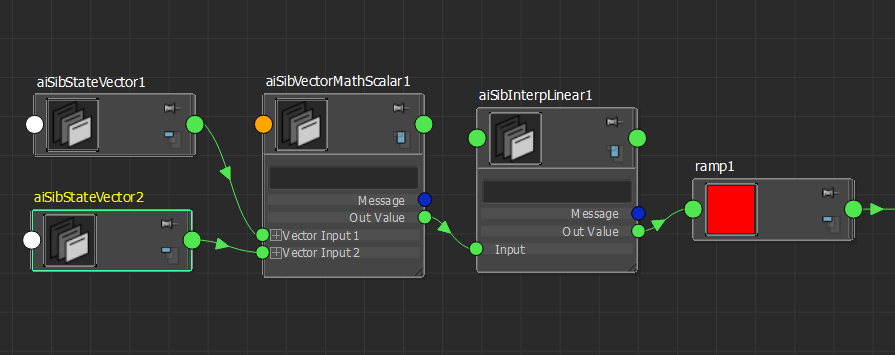
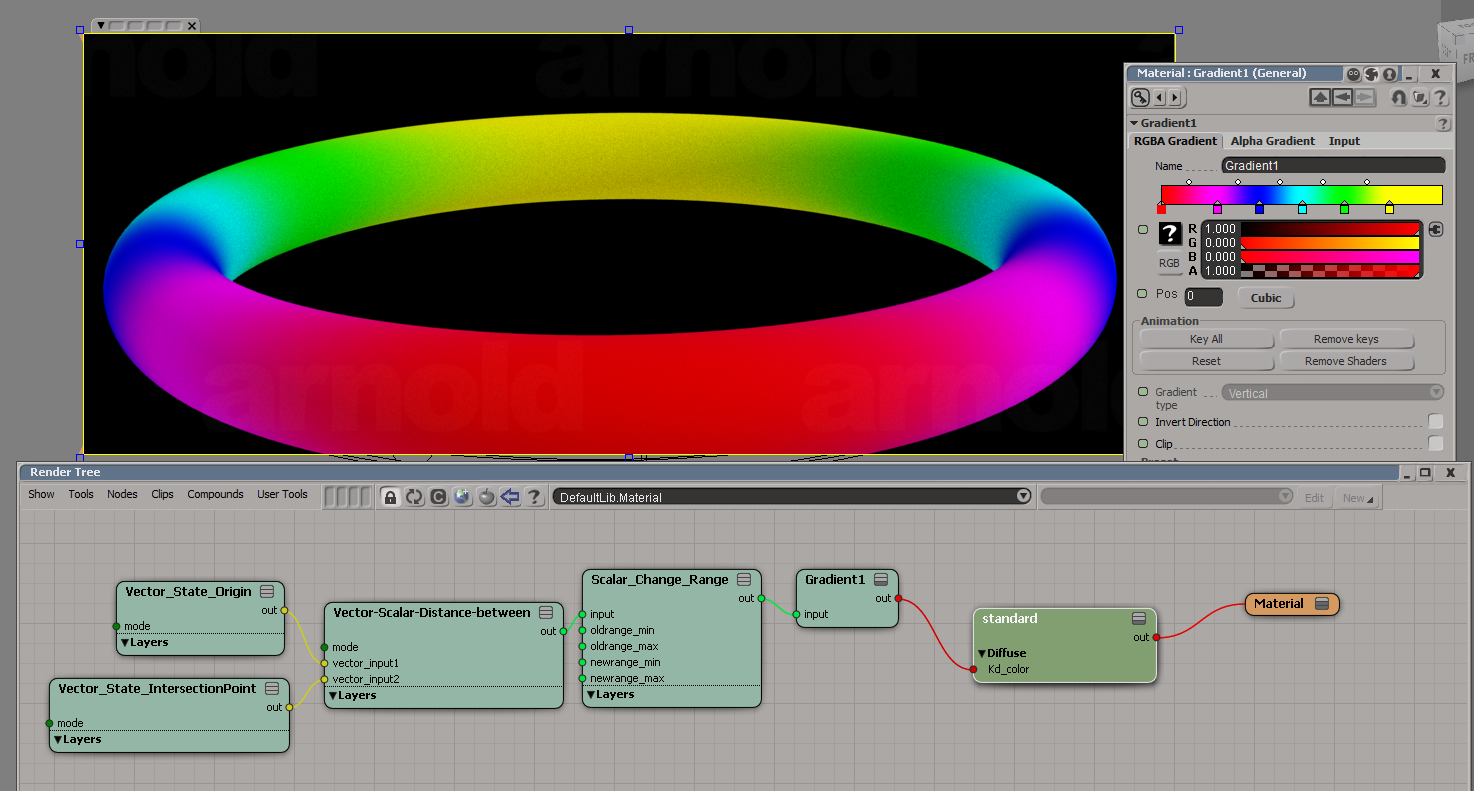
SItoA includes Arnold versions of the Softimage Vector State and Vector Scalar shaders, which you can use to do build a “distance between” shading network.

Vector State can get you the origin point of a ray and its intersection point, and Vector Scalar can get the distance between those two points.

vector_state_sitoa

You can even use these shaders in Maya (since they are just Arnold shaders). Just put sitoa_shaders somewhere in the ARNOLD_PLUGIN_PATH, and MtoA will load them. The shader UI in the Attribute Editor will be very basic (for example, integer input fields instead of drop-down lists), but you can use the shaders.

vector_state_mtoa

[Linux] Missing .sog files?


Sometimes on Linux you may get “unable to load dynamic library” errors for .sog files. Like this:

00:00:00     0MB WARNING |  unable to load dynamic library: /home/stephen/solidangle/mtoa/2014/xgen_procedural.sog: cannot open shared object file: No such file or directory 

or this:

00:00:00     0MB WARNING |  unable to load dynamic library: /usr/apps/houdini/houdini-13.0.343/htoa/arnold_plugins/driver_houdini.sog: cannot open shared object file: No such file or directory 

Don’t worry about the “.sog” part. In most cases, Arnold isn’t actually looking for a .sog file. Arnold is trying to load a .so file, and either the .so itself or a dependency is missing. The “.sog” is printed by mistake in the log message (and this is fixed in the next Arnold version).

So (heh) focus your investigation on why Arnold couldn’t load the .so file (try running ldd on it).

In the two examples above:

  • xgen_procedural.so couldn’t be loaded because LD_LIBRARY_PATH didn’t include the Maya lib folder, so all the tbb-related libraries were missing.
  • driver_houdini.so was missing some Houdini dependencies, but in this case it was being loaded into MtoA, so driver_houdini wasn’t needed and the warning could be safely ignored.

What’s a .sog?
If a plugin has a .sog extension, AiLoadPlugins() will load the plugin with RTLD_GLOBAL, which means the symbols from the plugin will be globally exposed and available to other plugins.

.sog is a Maya naming convention for an .so to be dlopen’ed with RLD_GLOBAL

[Arnold] [MtoA] Disabling Skip License Check


watermark
If you render a scene that has Skip License Check enabled, you’ll get the Arnold watermark. One way to make sure this doesn’t happen is to turn off Skip License Check from the command line:

render -r arnold -ai:slc off some_scene.mb
kick -set options.skip_license_check off -dp -dw some.ass

You might also want to enable Abort on License Fail (-ai:alf for render, -set options.abort_on_license_fail for kick).

[MtoA] [Scripting] Setting the output image format


Settings like the image format and compression come from the defaultArnoldDriver node, so to set them through scripting, you need to set defaultArnoldDriver attributes.
ImageFormat_ai_translator

The image format corresponds to the ai_translator attribute.

# Python
import maya.cmds as cmds
cmds.setAttr( 'defaultArnoldDriver.ai_translator', 'exr', type='string' )
# PyMel
import pymel.core as pm
d = pm.PyNode( 'defaultArnoldDriver' )
d.ai_translator.set( 'exr )
// Mel
setAttr "defaultArnoldDriver.ai_translator" -type "string" "jpeg";

The rest of the attributes are named a little… better 😉 Here’s a Python snippet to list the driver attributes and their values:


from maya.cmds import *
sn = cmds.attributeInfo( inherited=False, short=True, type="aiAOVDriver" )
for s in sn:
    print "defaultArnoldDriver.%s = %s" %( s, cmds.getAttr( "defaultArnoldDriver.%s" % s ) )

[MtoA] Installing custom shaders


So, you’ve downloaded some custom shaders and you want to get them into Maya? Here’s how:

  • Set ARNOLD_PLUGIN_PATH to point to the location of the shader DLL/SO and MTD files.
  • Set MTOA_TEMPLATES_PATH to point to the location of the shader template .PY files.

That’s it. MtoA uses those environment variables to find the shaders (the .DLL or .SO files), the shader metadata files (.MTD), and the shader templates (.PY).

A metadata file tells Maya how to handle the shader (for example, where to show it in the Assign New Materials window).
A shader template defines the UI for the shader in the Attribute Editor.

[MtoA] Scripting Standin paths


standin_path

To set a standin path, use the aiStandin.dso attribute:

import maya.cmds as cmds
cmds.setAttr( 'ArnoldStandInShape.dso','C:/Users/SOLIDANGLE/Documents/BlueDog.ass',  type='string' )
print cmds.getAttr( 'ArnoldStandInShape.dso' )

Here’s one way to list some of the attributes on a standin shape node, and find out what attribute to set:

import maya.cmds as cmds
ntype = cmds.nodeType( "ArnoldStandInShape" )
print cmds.attributeInfo( inherited=False, t=ntype )

for x in cmds.attributeInfo( inherited=False, t=ntype ):
    print "%s = %s" % (x, cmds.getAttr( "ArnoldStandInShape.%s" % x ))

Object color mode


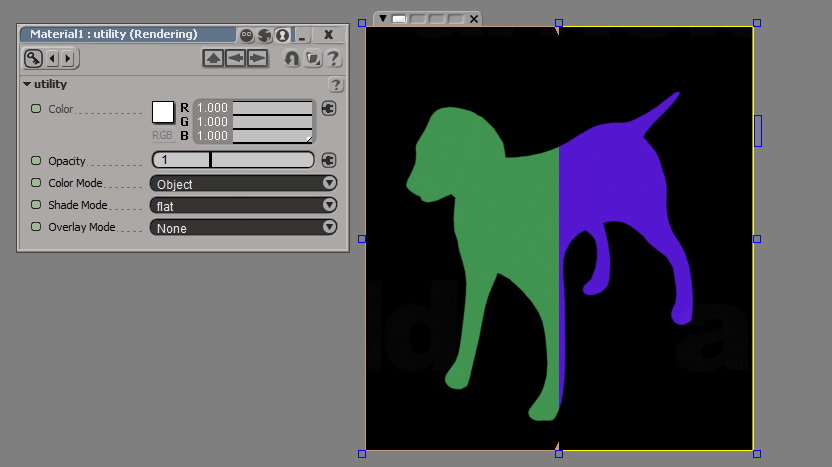
The Arnold Utility shader has an Object color mode, which assigns colors based on shape names. When we say “shapes”, we don’t mean Maya shape nodes; we mean the Arnold shapes.

C:\solidangle\mtoadeploy\2014\bin>kick -nodes | find "shape"
 box                              shape
 cone                             shape
 curves                           shape
 cylinder                         shape
 disk                             shape
 ginstance                        shape
 implicit                         shape
 nurbs                            shape
 plane                            shape
 points                           shape
 polymesh                         shape
 procedural                       shape
 sphere                           shape

All these nodes have a name parameter (for example, polymesh.name) that is a unique string identifier in the Arnold universe. So when you use the Object color mode, you get a unique color for each node.

If you’re using Softimage, note that SItoA puts the frame number into polymesh.name, so you’ll get a different color on each frame if you use the Object color mode. For example, on frame 5 a polymesh might be named “Dog_Mesh.SItoA.5000”, and on frame 6, “Dog_Mesh.SItoA.6000”.

In this render region comparison, you have frame 5 on the left, and frame 6 on the right:
dog_color_mode

In a case like this, you would use the Object ID color mode instead. SItoA automatically assigns unique IDs to the shape nodes (MtoA doesn’t).