Adding Arnold licenses to an existing RLM license server


If you’ve already have an RLM license server up and running, it’s easy to add your Arnold license to that server. Just download the Solid Angle RLM package, extract the solidangle.set and solidangle.opt files from the download, and copy them to your RLM folder. Then do a reread/restart of the server to pick up the Arnold licenses.

Just make sure you’re not running an older version of RLM. The Solid Angle license server (solidangle.set) requires RLM v10.1BL2 or later.

RLM is backwards compatible, which means you can always use a newer version of RLM with an older solidangle.set.

But RLM is not forwards compatible. You cannot use an older RLM with a newer solidangle.set. For example, you cannot use the current solidangle.set ISV server with RLM v9.4BL2.

If you use a newer solidangle.set with an older RLM, you’ll see something like this in the RLM log:

08/22 14:23 (rlm) RLM License Server Version 9.4BL2

        Copyright (C) 2006-2012, Reprise Software, Inc. All rights reserved.

08/22 14:23 (rlm) License server started on SOLIDANGLE-PC
08/22 14:23 (rlm) Server architecture: x86_w1
08/22 14:23 (rlm) License files:
08/22 14:23 (rlm)     arnold.lic
08/22 14:23 (rlm)
08/22 14:23 (rlm) Web server starting on port 5054
08/22 14:23 (rlm) Using TCP/IP port 5053
08/22 14:23 (rlm) Starting ISV servers:
08/22 14:23 (rlm)     ... solidangle on port 60008
08/22 14:23 (rlm) New thread created to watch ISV solidangle
(solidangle) Server settings (version 10) incompatible with RLM v9 software
(solidangle) This settings file must be used with RLM v10 (or later) software
08/22 14:23 (rlm)
08/22 14:23 (rlm) solidangle initialization error: 1, not restarting
08/22 14:23 (rlm)
08/22 14:23 (rlm) Server initialization error.
08/22 14:23 (rlm)
08/22 14:23 (rlm) This indicates either:
08/22 14:23 (rlm)  A settings file incompatible with this RLM version
08/22 14:23 (rlm)  - or -
08/22 14:23 (rlm)  The ISV server is built with an incorrect RLM license
08/22 14:23 (rlm)  - or -
08/22 14:23 (rlm)  The ISV server encountered an error processing its options fi
le.
08/22 14:23 (rlm)

For google: “solidangle initialization error: 1, not restarting”
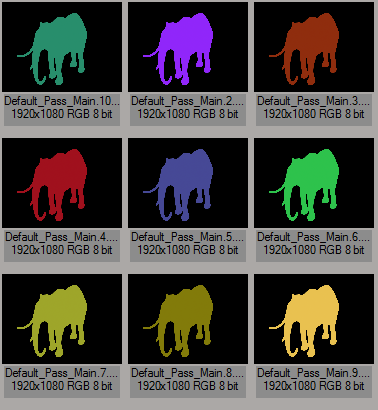
[SItoA] Understanding the Object color mode of the Utility shader


The Utility shader has an Object color mode that assigns colors to objects based on names. Each shape (for example, a polymesh shape or a curves shape or a box shape) gets a unique color, because each shape has a unique name.

If you’re working with SItoA, you may have noticed that the object color changes with each frame:
utility_color_mode

That’s because SItoA gives shapes names like Elephant.Elephant_Mesh.SItoA.4000, which change with every frame.

MtoA doesn’t use the current frame in shape node names, and neither does HtoA (by default). However, HtoA does provide an option for adding a suffix, like the frame number, to the shape node name.

[RLM] Checking for license denials by the license server


If you’re seeing watermarks on some machines but not on others, there’s usually a simple explanation: those machines cannot connect to the license server. The first thing you should do is check the RLM diagnostics on the license server. In particular, look for the solidangle Statistics, which will show you whether or not licenses are being denied. For example:

solidangle Statistics --- Since Start --- Since Midnight --- Recent ---
    Start time          03/29 18:40:20    04/01 00:00:24   04/01 12:41:30
    Messages:        39398 (   0/sec)   7755 (   0/sec)    20 (   0/sec)
    Connections:      4874 (   0/sec)   1073 (   0/sec)     4 (   0/sec)
    Checkouts:        4844 (   0/sec)   1050 (   0/sec)     3 (   0/sec)
    Denials:             0 (   0/sec)      0 (   0/sec)     0 (   0/sec)
    License removals:    0 (   0/sec)      0 (   0/sec)     0 (   0/sec)

More here…

[Arnold] Standins and the ASS file cache


Did you ever notice the ASS file cache stats in the Arnold log? It’s a breakdown of how many unique ASS files were loaded, and how many were reused:

03:11:33 8868MB | -----------------------------------------------------------------------------------------
03:11:33 8868MB | .ass file cache:
03:11:33 8868MB | unique (loaded from disk)     10 ( 1.00%)
03:11:33 8868MB | reused (found in cache)      990 ( 99.00%)
03:11:33 8868MB | total referenced .ass files 1000 (100.00%)
03:11:33 8868MB | -----------------------------------------------------------------------------------------

Roughly speaking, this caching of standins means that if you have 100 standins that all load the same ASS file, you’ll get one set of geometry and 99 instances of that geometry. That saves memory and I/O time and is just more efficient.

More here…

[Linux] Missing .sog files?


Sometimes on Linux you may get “unable to load dynamic library” errors for .sog files. Like this:

00:00:00     0MB WARNING |  unable to load dynamic library: /home/stephen/solidangle/mtoa/2014/xgen_procedural.sog: cannot open shared object file: No such file or directory 

or this:

00:00:00     0MB WARNING |  unable to load dynamic library: /usr/apps/houdini/houdini-13.0.343/htoa/arnold_plugins/driver_houdini.sog: cannot open shared object file: No such file or directory 

Don’t worry about the “.sog” part. In most cases, Arnold isn’t actually looking for a .sog file. Arnold is trying to load a .so file, and either the .so itself or a dependency is missing. The “.sog” is printed by mistake in the log message (and this is fixed in the next Arnold version).

So (heh) focus your investigation on why Arnold couldn’t load the .so file (try running ldd on it).

In the two examples above:

  • xgen_procedural.so couldn’t be loaded because LD_LIBRARY_PATH didn’t include the Maya lib folder, so all the tbb-related libraries were missing.
  • driver_houdini.so was missing some Houdini dependencies, but in this case it was being loaded into MtoA, so driver_houdini wasn’t needed and the warning could be safely ignored.

What’s a .sog?
If a plugin has a .sog extension, AiLoadPlugins() will load the plugin with RTLD_GLOBAL, which means the symbols from the plugin will be globally exposed and available to other plugins.

.sog is a Maya naming convention for an .so to be dlopen’ed with RLD_GLOBAL

[Tip] Searching the docs


Here’s a few tips for searching the docs at support.solidangle.com

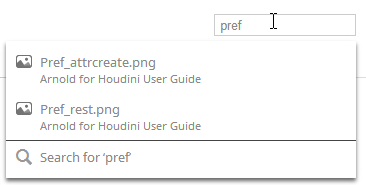
If you don’t see any useful suggestions when you type in a search, click the “Search for” link. That will take you to the Search page.
search-tips-1

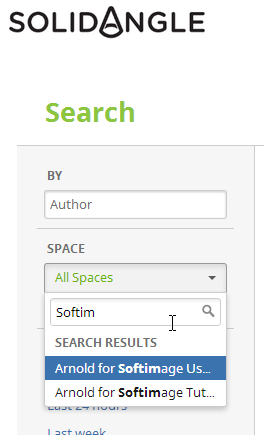
On the Search page, you can narrow down your search to a specific “space”, such as the Maya User Guide or the Softimage Tutorials.

search-tip-1a

If you don’t see the space you want, just start typing “Softimage” or “Maya” or “Arnold” in the search box, and then you’ll see those spaces and you can search just that one specific space.

search-tip-1b
You can also search for specific types of content, such as Pages or Blog Posts. I often click Pages to get rid of all the images (attachments) that show up in the search results.

[Arnold] [MtoA] Disabling Skip License Check


watermark
If you render a scene that has Skip License Check enabled, you’ll get the Arnold watermark. One way to make sure this doesn’t happen is to turn off Skip License Check from the command line:

render -r arnold -ai:slc off some_scene.mb
kick -set options.skip_license_check off -dp -dw some.ass

You might also want to enable Abort on License Fail (-ai:alf for render, -set options.abort_on_license_fail for kick).

Object color mode


The Arnold Utility shader has an Object color mode, which assigns colors based on shape names. When we say “shapes”, we don’t mean Maya shape nodes; we mean the Arnold shapes.

C:\solidangle\mtoadeploy\2014\bin>kick -nodes | find "shape"
 box                              shape
 cone                             shape
 curves                           shape
 cylinder                         shape
 disk                             shape
 ginstance                        shape
 implicit                         shape
 nurbs                            shape
 plane                            shape
 points                           shape
 polymesh                         shape
 procedural                       shape
 sphere                           shape

All these nodes have a name parameter (for example, polymesh.name) that is a unique string identifier in the Arnold universe. So when you use the Object color mode, you get a unique color for each node.

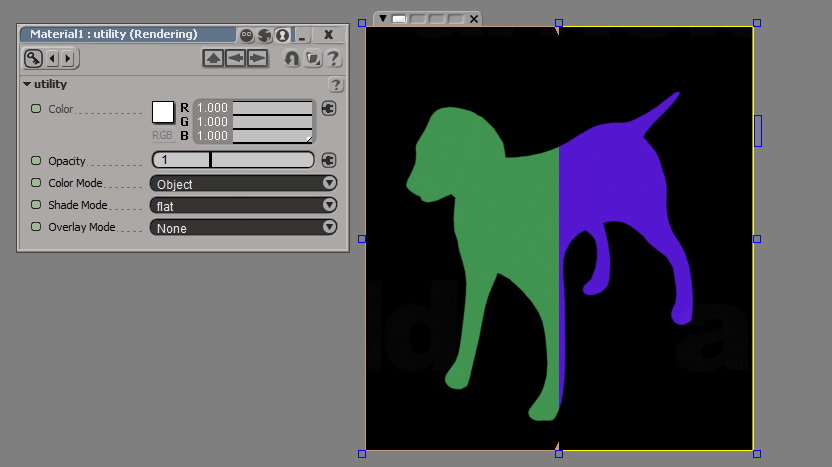
If you’re using Softimage, note that SItoA puts the frame number into polymesh.name, so you’ll get a different color on each frame if you use the Object color mode. For example, on frame 5 a polymesh might be named “Dog_Mesh.SItoA.5000”, and on frame 6, “Dog_Mesh.SItoA.6000”.

In this render region comparison, you have frame 5 on the left, and frame 6 on the right:
dog_color_mode

In a case like this, you would use the Object ID color mode instead. SItoA automatically assigns unique IDs to the shape nodes (MtoA doesn’t).

Soccer balls and Arnold procedurals


I’m partial, but I like the Softimage soccer ball better than the Maya soccer ball.
soccerballs

The Softimage soccer ball is the one on the left. I took the ASS file for the soccer ball, did a few search and replace ops, and compiled my first procedural node. It’s pretty trivial, but it illustrates the basic framework. numNodes() returns the number of nodes you’re going to create; Arnold calls getNode() once for each node you create. I’m just creating one node, so I do it in getNode(), but you could also do it in init().

If you’re interested in learning more about the Arnold SDK and procedurals, you can download the SDK (docs included) at solidangle.com.

#include <ai.h>
#include <string.h>

static int init(AtNode *mynode, void **user_ptr )
{
  AiMsgInfo( "[soccer] -- greetings!" );
  return 1;
}

static int cleanup( void *d )
{
  return 1;
}

static int numNodes( void *d )
{
  return 1;
}

static AtNode *getNode( void *d, int index )
{

	AtByte nsides[540] = {
		4, 4, 4, 4, 4,
		// ...
		4, 4, 4, 4, 4};
  
	unsigned int vidxs[2160] = {
		292, 301, 12, 293, 302, 303, 304, 305, 302, 305, 306,
		//...
		169, 538, 537, 116, 168, 540, 539, 79, 151, 25, 541};

	unsigned int nidxs[2160] = {
		0, 1, 2, 3, 4, 5, 6, 7, 4, 7, 8, 9, 4, 9, 10, 11, 4, 
		// ...
		1211, 1216, 1215, 1230, 1229, 311, 322, 1231, 312};

	float vlist[1626] = {
		2.33102179f, 4.68985701f, -7.74118519f, -4.0108633f, -2.08138514f, 8.18039227f,
		//...
		1.70574367f, 2.03463793f, 9.00535202f, 2.94963598f, 0.0429565944f, 8.85224628f};

	float nlist[3696] = {
		-0.00219265698f, -0.443717808f, -0.896163881f, -0.112498537f, -0.405027777f, -0.907356858f, 
		//...
		-0.316353977f, -0.846433043f, 0.428335458f, 0.514008343f, -0.00765316607f, 0.857751012f};

	AtMatrix m;
	AiM4Identity( m );
	
	AtNode *n = AiNode( "polymesh" );
	AiNodeSetByte(n, "visibility", 255);
	AiNodeSetArray(n, "vlist",  AiArrayConvert(1626,  1, AI_TYPE_FLOAT, vlist));
	AiNodeSetArray(n, "nsides", AiArrayConvert(540,  1, AI_TYPE_BYTE,  nsides));
	AiNodeSetArray(n, "vidxs",  AiArrayConvert(2160,  1, AI_TYPE_UINT,  vidxs));
	AiNodeSetArray(n, "nlist",  AiArrayConvert(3696,  1, AI_TYPE_FLOAT, nlist));
	AiNodeSetArray(n, "nidxs",  AiArrayConvert(2160,  1, AI_TYPE_UINT,  vidxs));
//	AiNodeSetArray(n, "uvidxs", AiArrayConvert(384,  1, AI_TYPE_UINT,  uvidxs));
//	AiNodeSetArray(n, "uvlist", AiArrayConvert(270,  1, AI_TYPE_FLOAT, uvlist));

	AiNodeSetMatrix(n, "matrix", m );

	AiNodeSetStr(n, "name", "SISoccerBall");
	return n;
};


// --------------------------------------------------------------------------------
// dso hook.
// --------------------------------------------------------------------------------
proc_loader
{
  vtable->Init     = init;
  vtable->Cleanup  = cleanup;
  vtable->NumNodes = numNodes;
  vtable->GetNode  = getNode;
  strcpy_s(vtable->version, AI_VERSION);
  return 1;
}