Soccer balls and Arnold procedurals


I’m partial, but I like the Softimage soccer ball better than the Maya soccer ball.
soccerballs

The Softimage soccer ball is the one on the left. I took the ASS file for the soccer ball, did a few search and replace ops, and compiled my first procedural node. It’s pretty trivial, but it illustrates the basic framework. numNodes() returns the number of nodes you’re going to create; Arnold calls getNode() once for each node you create. I’m just creating one node, so I do it in getNode(), but you could also do it in init().

If you’re interested in learning more about the Arnold SDK and procedurals, you can download the SDK (docs included) at solidangle.com.

#include <ai.h>
#include <string.h>

static int init(AtNode *mynode, void **user_ptr )
{
  AiMsgInfo( "[soccer] -- greetings!" );
  return 1;
}

static int cleanup( void *d )
{
  return 1;
}

static int numNodes( void *d )
{
  return 1;
}

static AtNode *getNode( void *d, int index )
{

	AtByte nsides[540] = {
		4, 4, 4, 4, 4,
		// ...
		4, 4, 4, 4, 4};
  
	unsigned int vidxs[2160] = {
		292, 301, 12, 293, 302, 303, 304, 305, 302, 305, 306,
		//...
		169, 538, 537, 116, 168, 540, 539, 79, 151, 25, 541};

	unsigned int nidxs[2160] = {
		0, 1, 2, 3, 4, 5, 6, 7, 4, 7, 8, 9, 4, 9, 10, 11, 4, 
		// ...
		1211, 1216, 1215, 1230, 1229, 311, 322, 1231, 312};

	float vlist[1626] = {
		2.33102179f, 4.68985701f, -7.74118519f, -4.0108633f, -2.08138514f, 8.18039227f,
		//...
		1.70574367f, 2.03463793f, 9.00535202f, 2.94963598f, 0.0429565944f, 8.85224628f};

	float nlist[3696] = {
		-0.00219265698f, -0.443717808f, -0.896163881f, -0.112498537f, -0.405027777f, -0.907356858f, 
		//...
		-0.316353977f, -0.846433043f, 0.428335458f, 0.514008343f, -0.00765316607f, 0.857751012f};

	AtMatrix m;
	AiM4Identity( m );
	
	AtNode *n = AiNode( "polymesh" );
	AiNodeSetByte(n, "visibility", 255);
	AiNodeSetArray(n, "vlist",  AiArrayConvert(1626,  1, AI_TYPE_FLOAT, vlist));
	AiNodeSetArray(n, "nsides", AiArrayConvert(540,  1, AI_TYPE_BYTE,  nsides));
	AiNodeSetArray(n, "vidxs",  AiArrayConvert(2160,  1, AI_TYPE_UINT,  vidxs));
	AiNodeSetArray(n, "nlist",  AiArrayConvert(3696,  1, AI_TYPE_FLOAT, nlist));
	AiNodeSetArray(n, "nidxs",  AiArrayConvert(2160,  1, AI_TYPE_UINT,  vidxs));
//	AiNodeSetArray(n, "uvidxs", AiArrayConvert(384,  1, AI_TYPE_UINT,  uvidxs));
//	AiNodeSetArray(n, "uvlist", AiArrayConvert(270,  1, AI_TYPE_FLOAT, uvlist));

	AiNodeSetMatrix(n, "matrix", m );

	AiNodeSetStr(n, "name", "SISoccerBall");
	return n;
};


// --------------------------------------------------------------------------------
// dso hook.
// --------------------------------------------------------------------------------
proc_loader
{
  vtable->Init     = init;
  vtable->Cleanup  = cleanup;
  vtable->NumNodes = numNodes;
  vtable->GetNode  = getNode;
  strcpy_s(vtable->version, AI_VERSION);
  return 1;
}

[rlm] The curious case of the missing log entries


In this case, I got a debug log from a customer, but there weren’t any rlm entries in the log. As I’ve mentioned before, the Arnold log can include entries for licensing. At the Warning + Info level, you’ll get [rlm] log entries like these, if something goes wrong:

00:00:10   444MB WARNING | [rlm] could not connect to any license server

or

00:00:00   444MB WARNING | [rlm] wrong license version for arnold 20140305, found licenses for:
00:00:00   444MB WARNING | [rlm] arnold 20140206 (20 licenses)
00:00:00   444MB WARNING | [rlm] please contact licensing@solidangle.com

or

00:00:03   749MB WARNING | [rlm] error checking out license for arnold (version 20140113):
00:00:03   749MB WARNING | [rlm]  * Communications error with license server (-17)
00:00:03   749MB WARNING | [rlm]  * Connection refused at server (-111)

And if you move the verbosity level up to Debug, then you’ll get some information about where Arnold is trying to get a license:

00:00:00   444MB         | [rlm] checking connection to license servers ...
00:00:05   444MB         | [rlm]  5055@LICSERVER1 ... DOWN
00:00:10   444MB         | [rlm]  5053@localhost ... DOWN

So why didn’t the customer’s log show any rlm entries? He was getting watermarks, so something must be wrong, right? Well, something was wrong: Skip License Check was enabled in the Render Settings.

No rlm log entries = Skip License Check

[Arnold] Gamma and linear input data


Arnold has three global settings for linearizing input data by applying an inverse-gamma correction. By default, texture maps, light colors, and shader colors are assumed to be already linear, but if you need to linearize them, set the gammas to 2.2.

C:\solidangle\Arnold-4.1.3.3\bin>kick -info options | find "gamma"
FLOAT         texture_gamma                     1
FLOAT         light_gamma                       1
FLOAT         shader_gamma                      1

Notes

  • The texture_gamma applies only to non-floating point textures. Floating point (Half, Float) textures are assumed linear.
  • Texture maps used to control things like normals, displacement, and opacity, will also be linearized if you set texture_gamma to 2.2.
  • The light and shader gammas apply to colors picked from color swatches in the application UI (that is, color ports that don’t have a shader tree plugged into them).

In plugins like SItoA and MtoA, you can find these gamma settings in the global render options.

I guess I should mention that in Softimage, you could use the built-in color management and leave these all set to 1.

[MtoA] Deadline and MtoA 1.0.x


Update: Deadline 6.1 and later support MtoA 1.0.x

Recently I discovered that Deadline 6.0 doesn’t work with MtoA 1.0.x, and it’s because of a change to the MtoA verbosity levels controls in the Render Settings UI. I think an update for Deadline will soon take care of this problem.

This is the error that stops everything:

0: WARNING: Strict error checking on, ignoring the following unrecognized error or warning. If it is fatal, please email support@thinkboxsoftware.com with the error message.
0: STDOUT: Error: No object matches name: defaultArnoldRenderOptions.log_console_verbosity

At first, I “ignored” that error in the log, but after I eliminated all other possible causes, I came back to it.

I worked around it by editing the default MayaBatch.py file in the DeadlineRepository (on my machine, that’s here: C:\DeadlineRepository6\plugins\MayaBatch\MayaBatch.py).

Go to lines 910, 911, and 912, and change lines 911 and 912 to look like this:

elif self.Renderer == "arnold" or self.Renderer == "arnoldexport":
self.Verbosity = self.GetPluginInfoEntryWithDefault( "ArnoldVerbose", "2" )
return 'removeRenderLayerAdjustmentAndUnlock defaultArnoldRenderOptions.log_verbosity; catch(`setAttr defaultArnoldRenderOptions.log_verbosity ' + self.Verbosity + '`);'

When you submit a job, make sure you set the Arnold verbosity level to 0, 1, or 2. Nothing higher.

Solid Angle’s New Website


The minimalist solidangle.com is gone. Check out our new web site:

  1. Read the latest Arnold news.
  2. Download and try the latest versions of Arnold for Maya and Softimage.
  3. Check out the Customer gallery and see the amazing work that our users have creating with Arnold. Feel free to participate: send us your amazing Arnold renders.
  4. Learn the technology behind Arnold in the past white papers on our Arnold Research section.

Plus plenty, plenty more. Arnold is no longer in the dark, so come and see what it’s all about.

[MtoA] Installing MtoA 1.0.0 on Linux


A few notes:

  • You need root permissions to do the automatic installation.
  • Use sudo, not su. You want to install MtoA under your user account, not the root user account. sudo will let you install MtoA with root permissions, but under your own user account.
  • If you install as root, the MtoA installer copies mtoa.mod to /root/maya/2014-x64/modules. Unless you’re running Maya as root, that’s no good. You want the mtoa.mod file in your home directory (for example, /home/stephen/maya/2014-x64/modules). That way, when you run Maya it will load mtoa.mod and find the MtoA plugin.
  • The automatic installation also copies arnoldRenderer.xml to /usr/autodesk/maya2014-x64/bin/rendererDesc. That allows you to batch render with Arnold from Maya, without having to set MAYA_RENDER_DESC_PATH.

Entry point not found


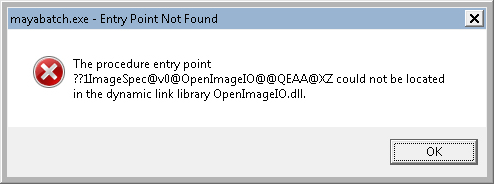
An Entry Point Not Found error message might look rather weird (because you’re looking at the decorated name of a function).
mayabatch_Entry_Point_Not_Found
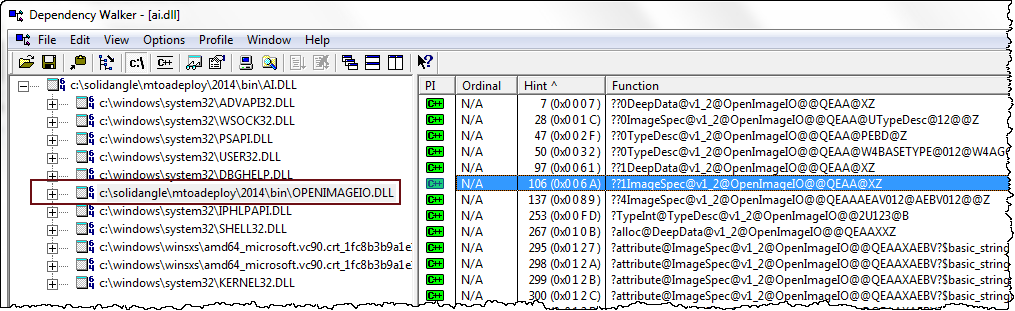
but usually such an error just means that the wrong version of a DLL (in this case, OpenImageIO.dll) is being loaded by the main program (mayabatch in this case). The problem could be as simple as your PATH pointing to another application that ships a different version of the DLL.

Using Dependency Walker, you can check a DLL to see the decorated names of the functions it exports. But usually you don’t have to dig down to that level a detail. Dependency Walker will show you what version of the DLL is being loaded, and that’s usually enough.
depends_openimageio.dll

[MtoA] [SItoA] Setting multiple Arnold parameters with the User Options


If you need to set multiple parameters in the User Options, you can use whitespace (spaces, tabs, and newlines) as delimiters to separate parameter statements. For example:

enable_procedural_cache off error_color_bad_pixel 1 .25 1 declare test constant FLOAT test 2
enable_procedural_cache off\n error_color_bad_pixel 1 .25\n declare test constant FLOAT\n test 2