A quick walk through of how to run the MtoA installer on Mac OS X.
https://vimeo.com/88386396
Installing MtoA on Mac OS X
Reply
A quick walk through of how to run the MtoA installer on Mac OS X.
https://vimeo.com/88386396
Update: Deadline 6.1 and later support MtoA 1.0.x
Recently I discovered that Deadline 6.0 doesn’t work with MtoA 1.0.x, and it’s because of a change to the MtoA verbosity levels controls in the Render Settings UI. I think an update for Deadline will soon take care of this problem.
This is the error that stops everything:
0: WARNING: Strict error checking on, ignoring the following unrecognized error or warning. If it is fatal, please email support@thinkboxsoftware.com with the error message.
0: STDOUT: Error: No object matches name: defaultArnoldRenderOptions.log_console_verbosity
At first, I “ignored” that error in the log, but after I eliminated all other possible causes, I came back to it.
I worked around it by editing the default MayaBatch.py file in the DeadlineRepository (on my machine, that’s here: C:\DeadlineRepository6\plugins\MayaBatch\MayaBatch.py).
Go to lines 910, 911, and 912, and change lines 911 and 912 to look like this:
elif self.Renderer == "arnold" or self.Renderer == "arnoldexport":
self.Verbosity = self.GetPluginInfoEntryWithDefault( "ArnoldVerbose", "2" )
return 'removeRenderLayerAdjustmentAndUnlock defaultArnoldRenderOptions.log_verbosity; catch(`setAttr defaultArnoldRenderOptions.log_verbosity ' + self.Verbosity + '`);'
When you submit a job, make sure you set the Arnold verbosity level to 0, 1, or 2. Nothing higher.
This short (under two minutes) video looks at the values you enter in the Arnold sampling controls, and how they determine the actual number of samples.
https://vimeo.com/85292357
A few notes:
An Entry Point Not Found error message might look rather weird (because you’re looking at the decorated name of a function).
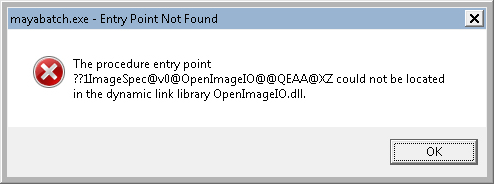
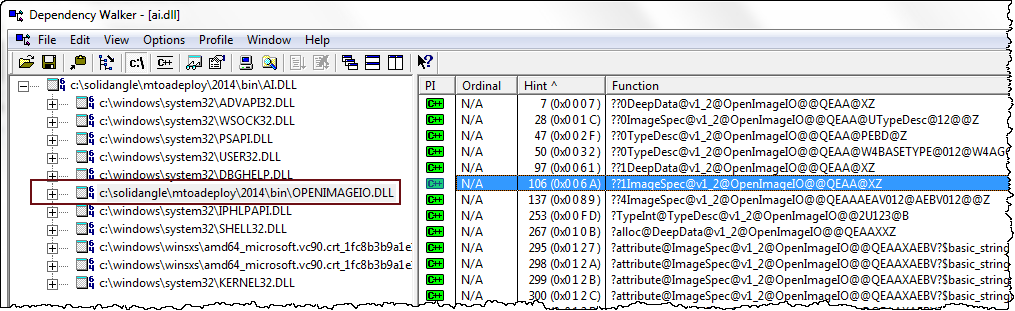
but usually such an error just means that the wrong version of a DLL (in this case, OpenImageIO.dll) is being loaded by the main program (mayabatch in this case). The problem could be as simple as your PATH pointing to another application that ships a different version of the DLL.
Using Dependency Walker, you can check a DLL to see the decorated names of the functions it exports. But usually you don’t have to dig down to that level a detail. Dependency Walker will show you what version of the DLL is being loaded, and that’s usually enough.
If you need to set multiple parameters in the User Options, you can use whitespace (spaces, tabs, and newlines) as delimiters to separate parameter statements. For example:
enable_procedural_cache off error_color_bad_pixel 1 .25 1 declare test constant FLOAT test 2
enable_procedural_cache off\n error_color_bad_pixel 1 .25\n declare test constant FLOAT\n test 2
Arnold 4.1.x has plenty of new features and improvements, and you can read about those in the release notes.
Here’s a few other little things to know about Arnold 4.1.x:
Cross posted here
NOTE: This is a Maya issue that can happen with any renderer, including mental ray.
Like many other Maya users, I started getting this error when I tried to batch render:
// Error: line 1: Socket error creating command port SOLIDANGLE-PC:7835 (10048).
I checked the port 7835 with netstat, and that gave me a PID (process ID) of 109736
C:\Program Files\Autodesk\Maya2014\bin>netstat -ano | find "7835"
  TCP    XXX.XXX.XXX.XXX:7835   0.0.0.0:0              LISTENING       109736
But unfortunately, there didn’t seem to be any process with that PID, so I couldn’t kill it to free up the port. tasklist | find “109736” came up empty; there was no such PID in the Task Manager or Process Explorer; and TCP View said that PID was non-existent.

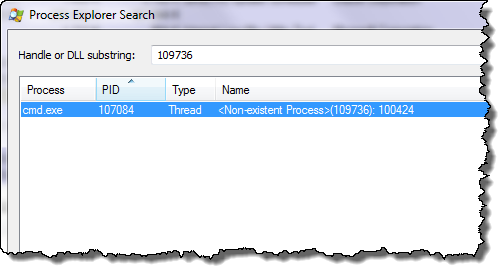
I was resigned to having to reboot my machine until I saw this. Then I used Process Explorer to find the process that was referencing the “non-existent” PID, and when I killed that process, I could batch render again from Maya.
When you’re rendering with Arnold, convert your texture maps to .tx files with maketx. Always 🙂
.tx textures are better because they are:
Arnold loads one tile at a time, as needed, rather than loading the entire texture map in memory. So textures are loaded faster, because Arnold loads only what it needs to render the image.
Arnold uses a texture cache system to efficiently manage texture memory usage: only the most recently used tiles are kept in memory. You can have hundreds, or even thousands, of 4k and 8k images, and Arnold will never use more runtime memory than the user-specified max cache size.
Mip-mapped textures are anti-aliased, even at low AA sample settings.
If you don’t convert your texture maps with maketx, the default Arnold behavior is to auto-tile and auto-map your textures for you, but this is very inefficient because it is done once for every rendered frame, rather than one-time-only with maketx.


 Arnold Support Corner