[Arnold] [RLM] ARNOLD_LICENSE_HOST and ARNOLD_LICENSE_PORT no longer supported


If you’re still using ARNOLD_LICENSE_HOST and ARNOLD_LICENSE_PORT, now’s the time to stop. As of Arnold 4.2.4.0, these deprecated environment variables are no longer supported.

Instead, use solidangle_LICENSE.

For example, if you currently have these environment variable settings:

ARNOLD_LICENSE_HOST=lic_server
ARNOLD_LICENSE_PORT=5055

you can replace them with this:

solidangle_LICENSE 5055@lic_server

Note: solidangle_LICENSE was added in Arnold 4.0.4 (released back in 23-May-2012).

Also new with Arnold 4.2.4.0 is the ability to use a .lic file instead of an environment variable. Just create a .lic file that looks like this:

HOST lic_server 5055

and put the .lic file in the same folder as Arnold (ai.dll, libai.so, or libai.dylib).

If you want to put the .lic file somewhere else, then you need to set solidangle_LICENSE to point to the lic file.

The case of the disappearing particles


In this case, nParticles (render type = point) weren’t visible behind a refractive plane:
particles_not_visible

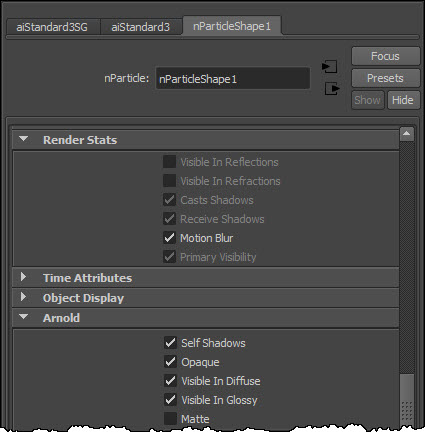
For the points render type, you get an Arnold points shape (with mode “disk”), so I exported an ASS file to see the parameter settings on the points node. I noticed the visibility 243 right away (the default visibility is 255, which is visible to all rays). And sure enough, in the Render Stats for the particle shape, some rays were turned off (and the check boxes were disabled too).
particles_render_stats

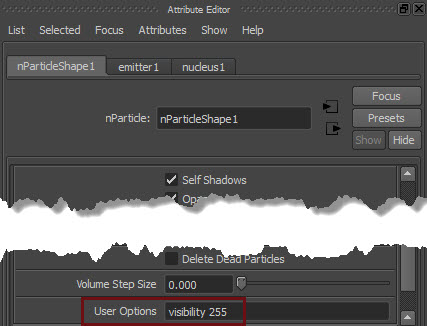
I used the User Options to force the visibility to 255
particles_useroptions
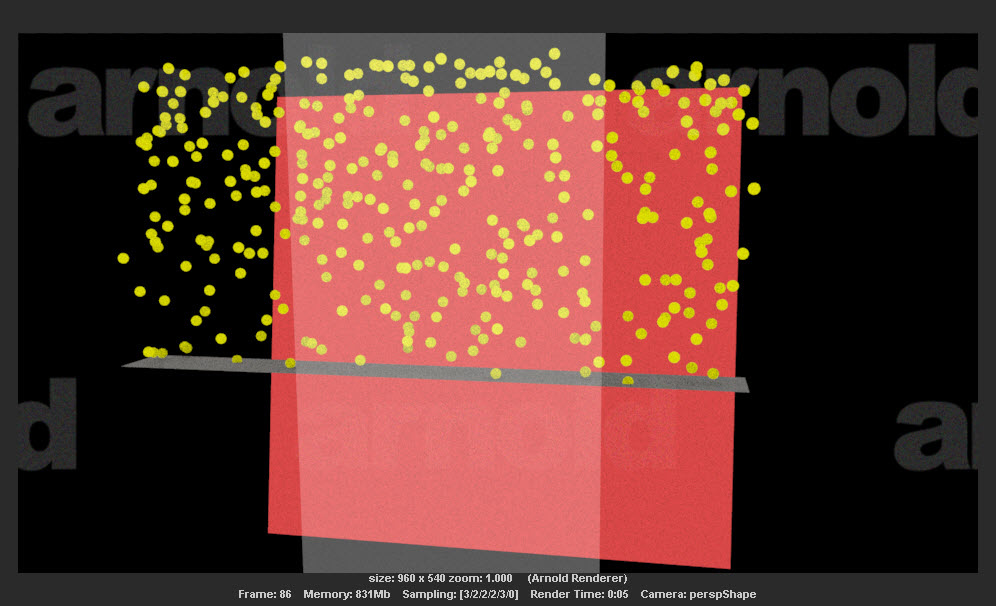
and the particles behind the refractive surface appeared:
particles_visible

This is a Maya thing. For most particle render types, the particles are not visible in reflections or refractions. It says so in the docs:

You can turn on reflections, refractions, and shadows when you software render Clouds, Tubes, and Blobby Surfaces

I’m not sure where the default values are set, but I did find the AEtemplate code that disables the render stats for all particle render types except the “s/w” type:

// C:\Program Files\Autodesk\Maya2015\scripts\AETemplates\AEparticleLayout.mel
		if( $value == 7 || $value == 8 || $value == 9 ) {
			// software particle type
			editorTemplate -dimControl $nodeName "visibleInReflections" false;
			editorTemplate -dimControl $nodeName "visibleInRefractions" false;
			editorTemplate -dimControl $nodeName "castsShadows"    		false;
			editorTemplate -dimControl $nodeName "receiveShadows" 		false;
			editorTemplate -dimControl $nodeName "primaryVisibility" 	false;
		} else {
			// hardware particle type
			editorTemplate -dimControl $nodeName "visibleInReflections" true;
			editorTemplate -dimControl $nodeName "visibleInRefractions" true;
			editorTemplate -dimControl $nodeName "castsShadows"			true;
			editorTemplate -dimControl $nodeName "receiveShadows" 		true;
			editorTemplate -dimControl $nodeName "primaryVisibility" 	true;
		}

So, since that AE template code just enables and disables UI controls, but doesn’t change the actual values, another way to enable Visible in Refractions (or Visible in Reflections) is to do this:

  1. Change the Particle Render Type to one of the “s/w” types, like Blobby Surface.
  2. Now the Visible in Refractions check box is enabled.
  3. Select the check box.
  4. Go back and change the Particle Render Type to points.

Now when you render, the points are visible to refraction rays, so they show up behind the glass.

[Arnold] [Python] Iterating over the shape nodes in a scene


Here’s a snippet that loops over the shape nodes in an ASS file.

from arnold import *
AiBegin()

AiMsgSetConsoleFlags(AI_LOG_ALL)

# Required if the ASS file uses any SItoA shaders
AiLoadPlugins('C:/softimage/workgroups/sitoa-3.4.0-2015/Addons/SItoA/Application/Plugins/bin/nt-x86-64')

AiASSLoad('C:/softimage/projects/Support/Arnold_Scenes/Default_Pass_Main.1.ass')

# Iterate over all shape nodes
iter = AiUniverseGetNodeIterator(AI_NODE_SHAPE);
while not AiNodeIteratorFinished(iter):
	node = AiNodeIteratorGetNext(iter)
	print "[script] AiNodeGetName: {0}".format( AiNodeGetName( node ) )
	
	ne = AiNodeGetNodeEntry( node )
	print "[script]  AiNodeEntryGetName: {0}".format( AiNodeEntryGetName( ne ) )
	print "[script]  AiNodeEntryGetType: {0}".format( AiNodeEntryGetType( ne ) )
	print "[script]  AiNodeEntryGetTypeName: {0}".format( AiNodeEntryGetTypeName( ne ) )
	
AiNodeIteratorDestroy(iter)
AiEnd()

This would print something like this:

C:\solidangle\scripts>python shapes.py
[script] AiNodeGetName: root
[script]  AiNodeEntryGetName: list_aggregate
[script]  AiNodeEntryGetType: 8
[script]  AiNodeEntryGetTypeName: shape
[script] AiNodeGetName: cube.SItoA.1000
[script]  AiNodeEntryGetName: polymesh
[script]  AiNodeEntryGetType: 8
[script]  AiNodeEntryGetTypeName: shape

Note the root node of type list_aggregate. It’s shape used internally by Arnold. Just be aware that that root node is there in the universe, because even if you load an ASS file that contains just polymesh nodes, there will be a root node that you’ll have to skip over.

The case of the “cannot remove alias” RuntimeError


In this case, mayabatch reported some runtime errors when loading a certain scene:

# Traceback (most recent call last):
#   File "C:\solidangle\mtoadeploy\2015\scripts\mtoa\callbacks.py", line 415, in deferredCallback
#     func(*args, **kwargs)
#   File "C:\solidangle\mtoadeploy\2015\scripts\mtoa\aovs.py", line 471, in createAliases
#     pm.aliasAttr(sg + '.ai_aov_' + name, remove=True)
#   File "C:\Program Files\Autodesk\maya2015\Python\lib\site-packages\pymel\internal\pmcmds.py", line 134, in wrappedCmd
#     res = new_cmd(*new_args, **new_kwargs)
# # RuntimeError: 'aiStandardSG.ai_aov_direct_specular' is not a unique name.  Cannot remove alias.

Now, even though I have the advantage of access to the MtoA source code, the problem remained: how do I fix the scene and stop these errors? To find a solution (and understand the problem) I had to resort to examining the Maya ASCII version of the scene.

The “fix” was to clear the AOV names on the shadingEngine node:

setAttr "aiStandardSG.aovs[0].aov_name" -type "string" ""; 
setAttr "aiStandardSG.aovs[1].aov_name" -type "string" ""; 
setAttr "aiStandardSG.aovs[2].aov_name" -type "string" ""; 

The problem is that the shadingEngine node has some named custom AOVs, but no corresponding “attribute alias” list. So the AOV name couldn’t be found in the alias list, which in the error message came out as “not a unique name”.

In the Maya ASCII version of the problem scene, I saw this:

createNode shadingEngine -n "aiStandardSG"; 
	addAttr -ci true -h true -sn "aal" -ln "attributeAliasList" -dt "attributeAlias"; 
	setAttr -s 4 ".aovs"; 
	setAttr ".aovs[0].aov_name" -type "string" "direct_diffuse";
	setAttr ".aovs[1].aov_name" -type "string" "direct_specular";
	setAttr ".aovs[2].aov_name" -type "string" "indirect_diffuse";
	setAttr ".aovs[3].aov_name" -type "string" "indirect_specular";

instead of this:

createNode shadingEngine -n "aiStandard1SG";
	addAttr -ci true -h true -sn "aal" -ln "attributeAliasList" -dt "attributeAlias";
	setAttr ".ihi" 0;
	setAttr ".ro" yes;
	setAttr -s 4 ".aovs";
	setAttr ".aovs[0].aov_name" -type "string" "direct_diffuse";
	setAttr ".aovs[1].aov_name" -type "string" "direct_specular";
	setAttr ".aovs[2].aov_name" -type "string" "indirect_diffuse";
	setAttr ".aovs[3].aov_name" -type "string" "indirect_specular";
	setAttr ".aal" -type "attributeAlias" {"ai_aov_direct_diffuse","aiCustomAOVs[0]",
			"ai_aov_direct_specular","aiCustomAOVs[1]",
			"ai_aov_indirect_diffuse","aiCustomAOVs[2]",
			"ai_aov_indirect_specular","aiCustomAOVs[3]"} ;

I don’t know how the user managed to get the scene into that state 😉
The case of the missing PyMel debug log file


In several recent cases, I had to figure out why MtoA wouldn’t load on a render farm. The root cause turned out to be the PyMel debug log: ~/pymel.log

If PyMel cannot find or open ~/pymel.log, that stops PyMel and anything that uses PyMel (like MtoA).

On a render farm, this can happen if the render manager user account doesn’t have a home folder, ~/pymel.log doesn’t expand to a valid location, or if user doesn’t have read-write permissions on pymel.log.

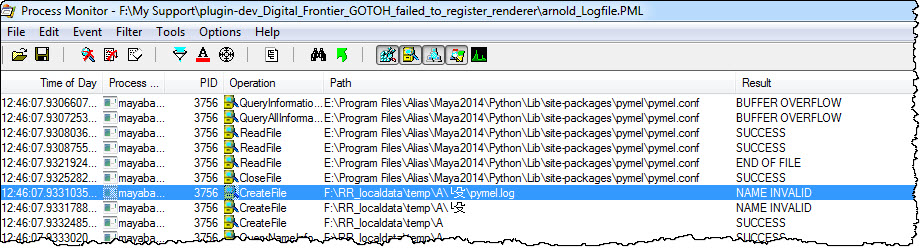
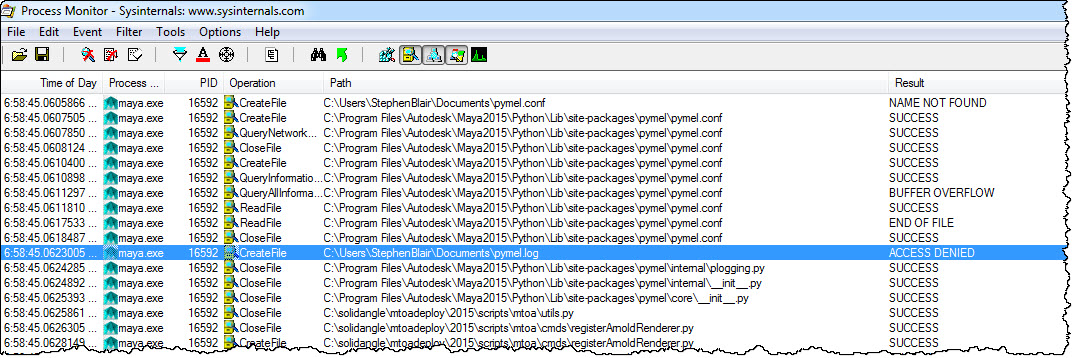
For example, here’s the Process Monitor log when ~ cannot be resolved:
pymel.log.2
And here’s the log when the user doesn’t have read-write permissions:
pymel.log
The location of pymel.log is specified by the pymel.conf configuration file, like this:

os.path.expanduser('~/pymel.log')

When there’s a problem with the PyMel debug log, it can be hard to tell from the MtoA errors. You may see API errors like this (but the line numbers all point to unrelated bits of source code). However, if you see these line numbers with the MtoA 1.x, it’s probably a pymel.log problem.

API error detected in plugins\mtoa\Main.cpp at line 794
: (kFailure): Unexpected Internal Failure
00:00:00   514MB ERROR   | Failed to register renderer 'arnold'

API error detected in plugins\mtoa\Main.cpp at line 716
: (kFailure): Unexpected Internal Failure
00:00:00   514MB ERROR   | Failed to register Arnold swatch renderer

API error detected in plugins\mtoa\Main.cpp at line 716
: (kFailure): Unexpected Internal Failure
00:00:00   515MB ERROR   | Failed to register Arnold swatch renderer

You might also see errors like this:

API error detected in plugins/mtoa/Main.cpp at line 794
: (kFailure): Unexpected Internal Failure
Error: line 1: IOError: file /Applications/Autodesk/maya2015/Maya.app/Contents/Frameworks/Python.framework/Versions/Current/lib/python2.7/logging/__init__.py line 916: 13
Error: line 1: Failed to register renderer 'arnold'
Error: line 1: initializePlugin function failed (mtoa)

Running multiple Arnold instances on the same computer


Arnold licenses are shared by host. That means all Arnold instances running on the same computer share the same license.

For example, you can have multiple copies of Houdini running on your computer, all doing render regions with HtoA, and you’ll be taking just a single Arnold license. Same thing with Softimage and Maya.

License sharing is defined by your license. The share=h in your license means that all processes (aka instances) running on the same host (aka computer) can share a single license.
license_file_share

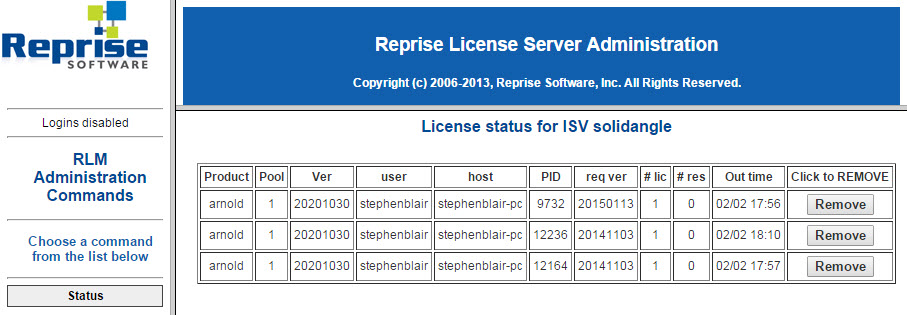
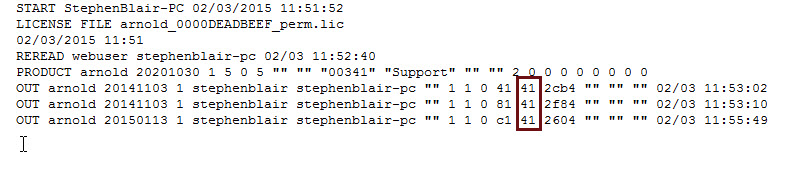
Even when licenses are shared, you will still see multiple checkouts in your license usage. For example, here’s my license usage when I have an IPR going in Maya, and render regions in Softimage and Houdini:
share_license_usage
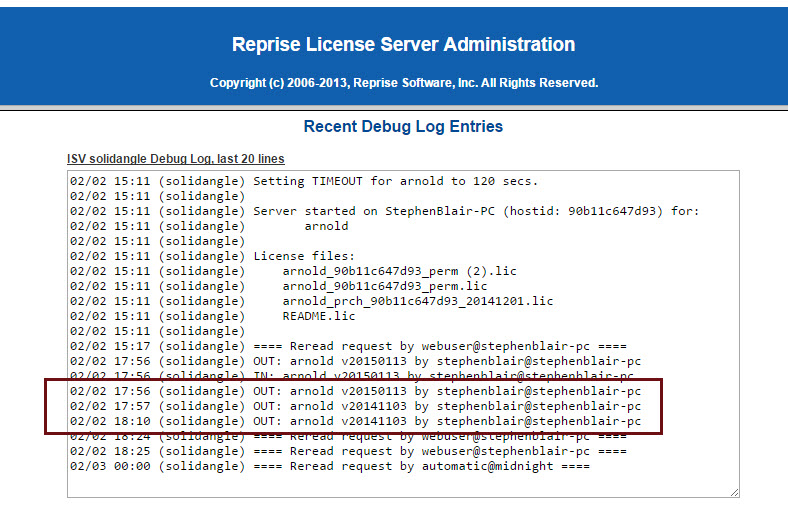
The debug log would show something similar:
share_debug_log
It might look like there are three licenses checked out, but it’s not. It’s just one license, checked out three times (aka shared three times).

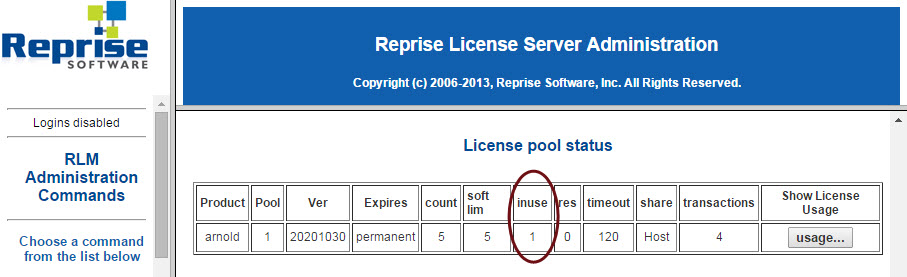
If I check my license pool status, I can see that one license is in use:
share_license_pool_status

And if you have reporting enabled, you can check the report and see that all three licenses have the same share handle (which means that the license is being shared):
share_report_log

[MtoA] The case of the instant crash when I load MtoA


In this case, Maya 2015 (Windows) disappeared a few seconds after I clicked the MtoA Loaded check box in the Plug-in Manager. Eventually I tracked it down to this line in my pluginPrefs.mel:

evalDeferred("autoLoadPlugin(\"\", \"PolyTools\", \"PolyTools\")");

Darn you PolyTools, I forgot about you 😉 There’s some kind of conflict between PolyTools (from the Maya BonusTools) and MtoA.

I tracked this down the hard way, by renaming my 2015 MAYA_APP_DIR to 2015-x64.bak and starting over with the default preferences, and then comparing the two.

An easier way (on Windows) would have been to use MTOA_STARTUP_LOG_VERBOSITY along with the -log command-line flag (for example, maya -log %TEMP%\mayastartup.log), which would have given me this:

****
* Arnold 4.2.4.0.wip windows icc-13.1.3 oiio-1.4.14 rlm-11.1.2 2015/01/23 16:50:01
* CRASHED in Tstring::formatToWidth at 00:00:00, pixel (0, 0)
* signal caught: error C0000005 -- access violation
*
* backtrace:
*  0 0x0000000045476700 [ai            ] AiArray                                                                                                                                                                               
*  1 0x0000000045477eff [ai            ] AiArray                                                                                                                                                                               
*  2 0x00000000773cb940 [kernel32      ] UnhandledExceptionFilter                                                                                                                                                              
*  3 0x00000000774e3398 [ntdll         ] MD5Final                                                                                                                                                                              
*  4 0x00000000774685c8 [ntdll         ] _C_specific_handler                                                                                                                                                                   
*  5 0x0000000077479d2d [ntdll         ] RtlDecodePointer                                                                                                                                                                      
*  6 0x00000000774691cf [ntdll         ] RtlUnwindEx                                                                                                                                                                           
*  7 0x00000000774a1248 [ntdll         ] KiUserExceptionDispatcher                                                                                                                                                             
>> 8 0x000007fee46eeb05 [FOUNDATION    ] Tstring::formatToWidth                                                                                                                                                                
*  9 0x000007fee46efff5 [FOUNDATION    ] Tstring::set                                                                                                                                                                          
* 10 0x000007febe593e9c [PolyTools     ] uninitializePlugin                                                                                                                                                                    
* 11 0x000007febe593feb [PolyTools     ] uninitializePlugin                   
...

[Arnold] [kick] Changing output paths for AOVs


The -o flag changes the output path for the beauty AOV only. For other AOVs, kick still uses the output paths specified in the ASS file (the AOV output paths are specified by the filename parameter of the driver nodes in an ASS file).

driver_exr
{
 name defaultArnoldDriver@driver_exr.RGBA.direct_diffuse
 filename "C:/Users/StephenBlair/Documents/maya/projects/Support/images/direct_diffuse/Natural_Museum.exr"
 compression "zip"
 half_precision off
 tiled off
 preserve_layer_name off
 autocrop off
 append off
}

It is possible, however, to use kick -set to change the output path and file name of specific AOVs, but you’d have to know the AOV names in advance. For example:

kick -set defaultArnoldDriver@driver_exr.RGBA.direct_diffuse.filename "C:/temp/direct_diffuse.exr" -i example.ass

[MtoA] Getting Deadline to pick up environment variable changes


Here’s why new environment variable settings (like, say, a new solidangle_LICENSE setting) are not always picked up by Deadline:

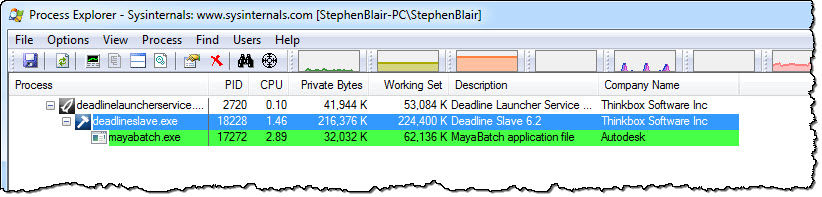
procmon_deadline_child_processes

Deadline Slave and MayaBatch are child processes of Deadline Launcher, and so they inherit their environment from their parent process (deadlinelauncherservice). If you don’t restart the Launcher, it won’t have the new environment, and neither will child processes like the Monitor or MayaBatch. Restarting the service will restart the child processes too.

deadlinelauncherservice_restart

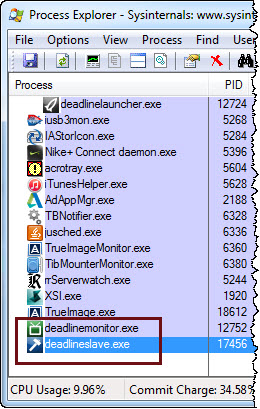
However, if you didn’t install the Launcher as a service, it is slightly more complicated. When you exit and restart the Launcher, the child processes may end up as “orphans” with the same old environment, and you’ll have to restart them too. In the screenshot below, Deadline Monitor and Deadline Slave were child processes of Launcher, but when I exited Launcher they kept running.

procmon_orphans

[MtoA] Mapping textures to Yeti hair


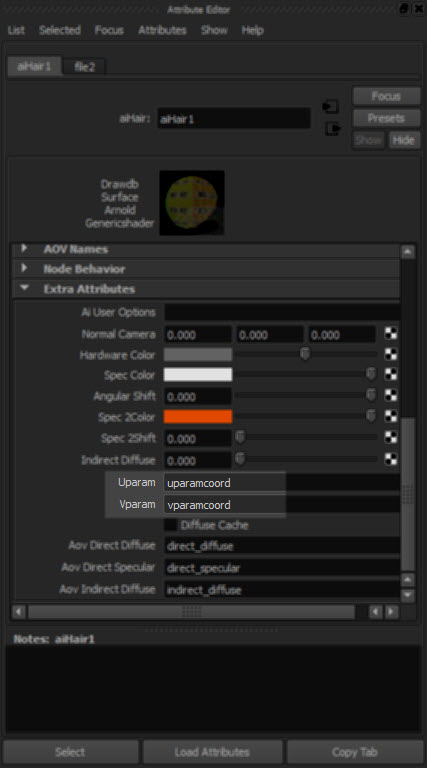
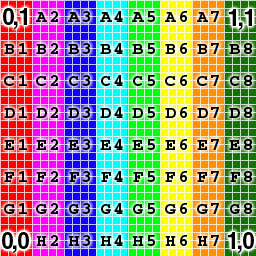
Like MtoA, Yeti exports UV coordinates in the uparamcoord and vparamcoord parameters, and you use these to map textures in the aiHair shader with the Uparam and Vparam extra attributes.
yet_uv_3

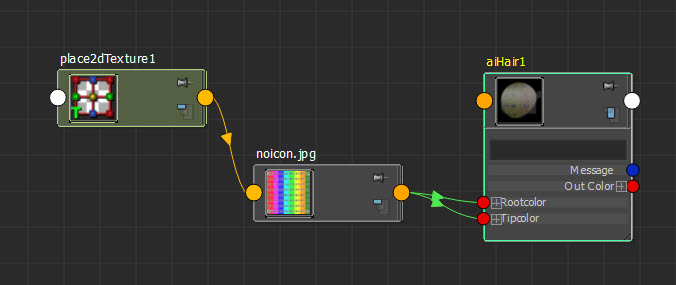
For example, if you plug a texture into the Rootcolor and tipcolor
yet_uv_2
then you can use uparamcoord and vparamcoord to map that texture onto the hair:
yet_uv_1

Tip If you enable Expand Procedurals and export an ASS file, you can see what parametes Yeti exports:

### created by pgYetiMayaShape
curves
{
 name pgYetiMayaShape_|pgYetiMaya|pgYetiMayaShape|scatter01_pSphereShape1_grow01
 num_points 621 1 b85UINT
# ...
 points 4347 1 b85POINT
# ...
 basis "catmull-rom"
 mode "ribbon"
 min_pixel_width 0
 visibility 255
 self_shadows on
 matrix
 1 0 0 0
 0 1 0 0
 0 0 1 0
 0 0 0 1
 shader "initialShadingGroup"
 opaque on
 id -1230660816
 declare curve_id uniform UINT
 curve_id 621 1 b85UINT
# ...
 declare uparamcoord uniform FLOAT
 uparamcoord 621 1 b85FLOAT
# ...
 declare vparamcoord uniform FLOAT
 vparamcoord 621 1 b85FLOAT
# ...
 declare surf_s uniform FLOAT
 surf_s 621 1 b85FLOAT
# ...
 declare surf_t uniform FLOAT
 surf_t 621 1 b85FLOAT
# ...
 declare length uniform FLOAT
 length 621 1 b85FLOAT
# ...
 declare fur_id uniform FLOAT
 fur_id 621 1 b85FLOAT
# ...
 declare surf_n uniform VECTOR
 surf_n 621 1 b85VECTOR
# ...
 declare filename constant STRING
 filename "C:/Users/StephenBlair/Documents/maya/projects/Support//yeti/tmp/yeti_combExample_pgYetiMayaShape_1886244453_1.fur"
 declare mtoa_shading_groups constant ARRAY NODE
 mtoa_shading_groups "initialShadingGroup"
 declare frame constant INT
 frame 1
 declare verbosity constant INT
 verbosity 1
 declare density constant FLOAT
 density 10
 declare width constant FLOAT
 width 1
 declare threads constant INT
 threads 0
 declare min_pixel_width constant FLOAT
 min_pixel_width 0
 declare mode constant INT
 mode 0
 declare imageSearchPath constant STRING
 imageSearchPath ""
 declare samples constant ARRAY FLOAT
 samples 1
}